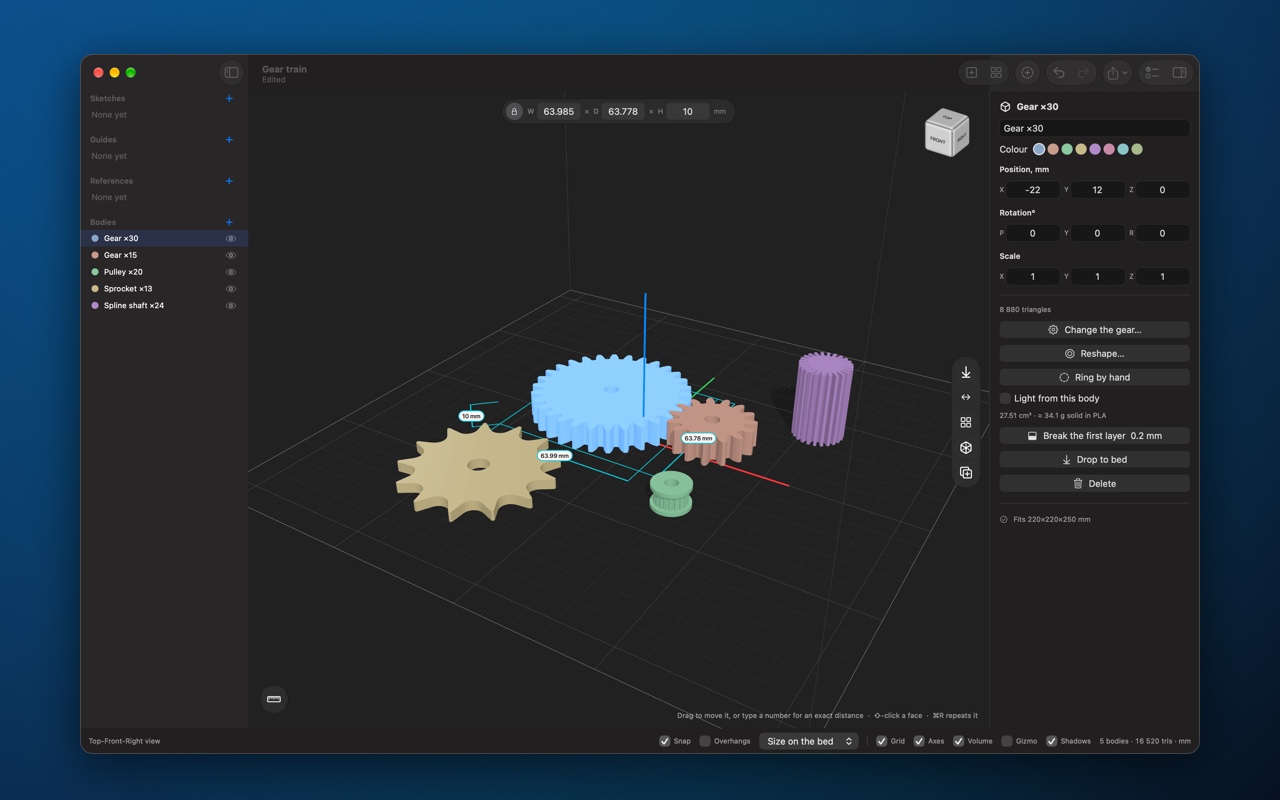
Brim CAD 26.2.0
models parts for 3D printing: 36 shapes and 15 ready-made jobs, from gears and threads to cases with lids, a check before you print, and one click to send the model to your slicer. Free to download, Pro is one purchase with no subscription.

models parts for 3D printing. Everything is in millimetres, Z is up, and the plate under the model is your printer's bed. What sits on it is what comes out.
It is built for parts that have to fit other parts: a gear on a shaft, a lid on a case, a screw in a hole. You type the numbers, the app builds the part, and your slicer gets a closed model of the right size.
SHAPES
• 36 shapes, each shown as a picture of itself: blocks, tubes, threads, springs, knurled knobs, vases and lettering
• Gears, sprockets, belt pulleys, chains, ratchets, cams, splines, worm drives and augers from module, teeth and pitch
• Panels and fittings: vent grilles, insert bosses, print-in-place hinges and ball joints, encoder discs, fans and impellers
• Name ornaments, snowflakes, stars and radial patterns
• A shape keeps its numbers: reopen it later and change 20 mm to 22 mm instead of drawing it again
WHOLE JOBS
• A case with a lid, vents and screw bosses
• A hose adapter, a fit-test coupon, a jigsaw, a QR code plate
• A sundial for where you live, a lithophane from a photo, an acoustic diffuser
• A cookie cutter, a stamp and a stencil from a drawing
WORKING EXACTLY
• Every drag lands on the snap step, and a number typed during a drag moves by exactly that much
• A ruler, sizes round the selection, kept measurements and guides
• Look inside a part through a guide plane without cutting it
CHANGING A BODY
• Add, subtract and intersect bodies
• Fillet and chamfer an edge, push and pull a face, cut ISO clearance holes for screws
• Lettering and texture on a face, cast a cavity, make a body lighter, repeat in a row or round a circle, mirror and align
• Sketches: extrude, revolve and sweep
• Trace a photo or a drawing into an outline, and model over a reference picture at its real size
BEFORE YOU PRINT
• Overhangs steeper than your limit turn red
• One check finds open surfaces, faces that cross, parts off the bed, parts too big for the printer and walls thinner than the nozzle
• A part too big for the bed splits into equal pieces pinned back together
• Pins, tongues, dovetails and snap fits between any two bodies
• Fit clearance, shrinkage and an elephant's foot chamfer in Settings
IN AND OUT
• Open in your slicer in one click: Bambu Studio, Orca, PrusaSlicer or any other
• Export 3MF, STL, OBJ and USDZ. 3MF keeps the unit, the names, the colours and where each part sits on the bed
• Import STL, 3MF, OBJ, USDZ, PLY and SVG
• Quick Look previews and thumbnails of projects in the Finder
• A part library and presets
FREE, WITH PRO
• Free to download, and the free version makes and prints a real part: plain shapes, sketches, booleans, arranging, import and every kind of export
• Brim CAD Pro is one purchase with no subscription: gears and the drivetrain, ready-made projects, lithophanes, stamps and cutters, and the printing helpers
• Try all of Pro free for 7 days
INTERFACE
• Light and dark appearance
• A built-in manual in eleven chapters, from your first part to keys and gestures, with a chapter on what the app does not do
• English and Russian
• No account, no tracking: nothing you make leaves your Mac unless you send it
Version history
Brim CAD is now free
• Download it and use it free: the plain shapes, sketches, booleans, arranging, import and every kind of export.
• Brim CAD Pro is one purchase with no subscription. It adds the gears and the drivetrain, the enclosures and other ready-made projects, lithophanes, stamps and cutters, and the printing helpers.
• Try all of Pro free for 7 days. Every Pro sheet opens with its live preview before you decide.
• If you had Brim CAD before, Pro is already yours.
Working with bodies
• Arrow keys move the picked bodies by the snap step, a tenth of it with ⇧.
• Lock a body: a click goes past it, and the gizmo and the arrow keys leave it alone.
• Object > Isolate (⌥⌘I) leaves only the picked bodies on screen while you work on them.
• Export just the picked bodies to 3MF, STL or straight to the slicer. The file is named after what is in it.
• Click the wall of a hole to see its diameter.
Enclosures
• A glued lid, with a ridge that leaves room for the glue and a groove that hides what squeezes out.
• A lid on a rubber ring: a groove round the lip for an O-ring, a cord or a tape-deck drive belt. It holds by friction or clicks into place.
• A gasket under a screwed lid, so the case keeps water out.
• A seam where the lid meets the case: a groove, a V chamfer or a recessed lid.
• Relief in the inside corners, so a board with sharp corners drops in flat.
Printing and parts
• Chamfer the first layer: a chamfer round the bottom of any body against elephant's foot, one cut along the whole outline.
• A spur gear keeps that chamfer among its own settings, so it stays exact and you can still reopen and change it.
• Top and bottom edges on a part pulled from a sketch: rounded or chamfered as it is made.
• Round or chamfer the whole rim of a picked face, holes in it included.
• Screw holes anywhere on a face: drag them on a plan of the face or type the distances. The sheet warns when a wall gets too thin.
• A plug and its socket from one drawing, with print clearance all round.
iPad
• Sheets fit their contents, so the buttons stay on screen.
• Tap a picked body again to pick a face or an edge. To pick several bodies, hold one finger on empty space and tap them with another.
Also
• More of the interface in Russian, including the view cube.
Enclosures
• A sliding lid now runs in a real groove round three walls and stops against the back, instead of lifting straight out. It slides in at any corner radius.
• A sliding lid can sit level with the top: a raised panel fills the opening and the front, so the closed case is flat.
• Snap-fit lids hold on a flat face rather than a thin ridge, and every lid comes out lying the way it prints.
• Screw holes in the lid can be plain, counterbored for a socket cap or countersunk for a flat head.
• Place openings from the middle of a face, as a datasheet does, or from the corner, as a caliper reads the finished box.
• Cut-outs and vents in the lid, and round holes in the walls go all the way through.
• Rounded corners of any radius keep the groove and the screw posts inside the wall.
Previews
• The preview in every wizard shows the sizes round the shape, and where each opening sits. A switch hides them.
• Larger previews, with no more flicker where a part stands on the bed.
Lattices and sketches
• 18 new lattice patterns, among them rosettes, Moroccan lanterns, star and cross, hemp leaf, chevrons and tumbling blocks.
• A fade can turn the openings as well as shrink them.
• Sketching helps more: snapping, typed side lengths, axis lock, mirror and closing a shape, and point coordinates you can type or nudge.
Also
• Projects saved before the rename open again.
• Fixes for the Russian interface and the tooltips.